Friday, September 26, 2008

SSDFC Smart Media Cards


SSDFC Smart Media memory cards

SmartMedia flash memory card is a removable flash memory card that can be used in several different types of digital devices; including digital cameras, digital music players and digital voice recorders. Smart Media flash memory is an elegently simple Flash RAM specification. A Thin Package Flash Memory IC is embedded in a card with a direct connection to the dataport. Smart Media cards from OpticsPlanet.com are fully compatible with all devices that run the Smart Media type flash memory cards. OpticsPlanet SmartMedia memory is one of the thinnest solutions for removable solid-state memory. About one third the size of a credit card and just as thin, SmartMedia is a small but durable format. Built with solid-state construction, with no moving parts that will wear down over time, our Smart Media will securely store your music, images and data.

The main advantage that SmartMedia cards have over the other memory cards is that because they read, write, and erase memory in small blocks of data (256 or 512 bytes at a time), you can more precisely select what data you want to save. Although the SmartMedia card was well received when it hit the market (especially the digital camera segment), SmartMedia cards have a few underlying weaknesses.

Capacities of SmartMedia cards are in sizes of 2mb, 4mb, 8mb, 16mb, 32mb, 64mb and top off at 128mb. Due to limited capacities, low transfer rates, it’s less sturdy encasing (compared to other flash memory card formats), the SmartMedia card has been replaced by other formats (primarily XD cards and SD cards).

OpticsPlanet.com SmartMedia has a simple structure in comparison with conventional memory cards. The NAND-type flash memory chip enhances the write and erase capabilities as data is rewritten in smaller increments. This results in improved performance through continuous data recording.
Optics Planet Smart Media card is a compact, reliable and competitive solution for today's digital devices.

SmartMedia Card Features:

* Thinnest Removable Form Factor
* SmarMedia Storage Capacities: 16MB to 128MB
* Nonvolatile Solid-State NAND Flash
* 22 Pad SmartMedia (SSFDC) Connector
* 3.3V Operation
* Low Power Consumption
* ID for Copyright Protection
* Automatic Program and Erase

Smart Media Card Applications:

* Digital Cameras
* PDA/Handheld PCs
* MP3 Players
* Word Processors
* GPS
* Cellular Phones
* Photo Printers
* Laptops

Buy more flash memory cards : www.oempcworld.com

Thursday, September 25, 2008

Olympus xD-Picture Card


Olympus xD-Picture Card (Type M and Type M+)


Olympus xD (Extreme Digital) Picture Card is the ultimate reusable, removable digital media. Besides providing increased storage capacities at higher resolutions, it also offers compatibility with most manufacturers’ xD-compatible devices and is the only xD-Picture Card to support the Panorama function found with today’s Olympus digital cameras.

The Type M and Type M+ xD-Picture Card keeps your photo, movie and other files safe and sound so you can enjoy them any way you want (viewing, sharing, slideshows, etc.) and any time. The compact size lets you carry it anywhere and because it’s compatible with many reader/writers, you can download data to a computer or another device in a jiffy.

The Type M+ xD-Picture card is compatible with all cameras and is 1.5 times faster than the Type M card. The increase in speed may be useful in sequential shooting of digital stills and in the recording of high-density video with Olympus cameras.

When it comes to your pictures, quality and reliability can’t be compromised. That’s why the xD-Picture Card is the finest compact, durable removable media your camera will ever know

The xD-Picture Card is a flash memory card format developed and introduced to the market in July 2002 by Olympus and Fujifilm, and manufactured by the Toshiba Corporation. xD cards are in Olympus and Fujifilm digital cameras, and are available in a range of sizes, from 16 MB to 1 GB currently. A higher-performance xD card known as Type M came out in 2005, and uses Multi Level Cell (MLC) architecture. The 1GB Type M card is called the M1GB (M-XD1GM). Type M cards will eventually be available in sizes up to 8 GB, though the cards are not compatible with all older model cameras.


xD cards are available from a wide variety of manufacturers, they are not the most expensive format, and they also offers many advantages.As of June 2005, the maximum size of released xD cards compares favourably to the various other flash card standards. xD cards are available in sizes up to one gigabyte. Other smaller formats Flash Cards which match xD's size more closely have lower or the same capacity.

Buy more XD Picture Cards:www.oempcworld.com

Wednesday, September 24, 2008

RAMBUS MEMORY


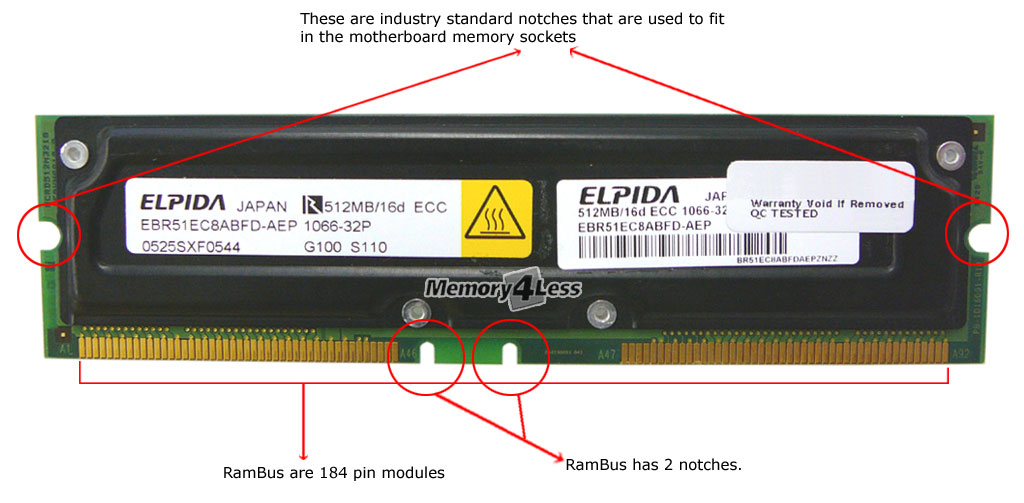
184-pin Rambus RDRAM RIMM

RAMBUS:
Direct Rambus is a high-speed memory technology that uses a narrow 16-bit bus (Rambus channel) to transmit data at speeds up to 800MHz. PC600: 16-bit, single channel RIMM, specified to operate at 300 MHz clock speed, 1200 MB/s bandwidth


approx. 5.25” x 1.25”

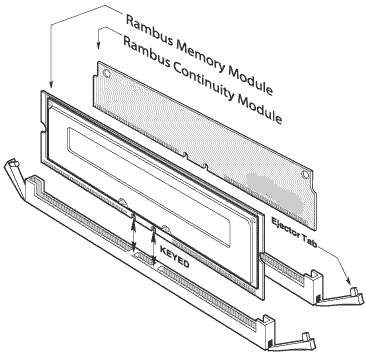
The Rambus ® RIMM™ module is a general purpose high-performance memory module suitable for use in a broad range of applications including computer memory, personal computers, workstations, and other applications where high bandwidth and low latency are required.

Features
  • High speed 1066, 800, 711 and 600 MHz RDRAM storage
  • 184 edge connector pads with 1mm pad spacing
  • Maximum module PCB size: 133.5mm x 31.75mm x 1.37mm (5.25" x 1.25" x 0.05")
  • Each RDRAM has 16 banks, for a total of 256, 192, 128, 96, or 64 banks on each 128MB, 96MB, 64MB, 48MB, or 32MB module respectively
  • Gold plated edge connector pad contacts
  • Serial Presence Detect (SPD) support
  • Operates from a 2.5 volt supply (±5%)
  • Low power and power down self refresh modes
  • Separate Row and Column buses for higher efficiency


RDRAM delivers pure performance where it matters most: leading-edge applications. Whether on multimedia, network packet switching, content creation, etc., RDRAM unleashes the processing power of your system. High-bandwidth RDRAM is essential to drive top performing processors. RDRAM provides a flexible solution to meet bandwidth requirements of tomorrow's high performance systems. RDRAMs system solution scales easily from 800Mhz to 1066Mhz to 1200Mhz. Additionally, commodity RDRAM components are configurable in a range of RIMM module configurations from 16 to 32 and 64 bit data busses. These RIMM module solutions offer up to 9.6 GByte/second of memory performance while retaining standard PC form factors.

There are 3 independent attributes that define which specification a RAMBUS module belongs to:

Clock speed: 800MHz, 1066MHz.
Latency: 45ns, 40ns, 32ns.
Bus width: 16-bit, 32-bit.

Buy more Memory :www.oempcworld.com

Tuesday, September 23, 2008

PCMCIA Compact Flash Adapter


PCMCIA Compact Flash Adapter (CGI)

Description:
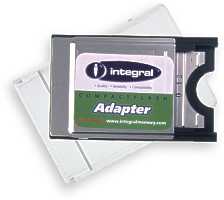
PCMCIA Adapter For Compact Flash Card CF Type I for use in notebooks and music keyboards with PC Card PCMCIA slots.
CompactFlash is used in such a wide variety of appliances ranging from PDA's, digital cameras and MP3 players that if you have a portable computer or system that is capable of accepting PCMCIA - this adapter is a must have. The PCMCIA CompactFlash adapter is true plug and play, requiring absolutely no drivers or software to enable you to transfer files.

Slip a CompactFlash Type I memory card (the most popular form of CompactFlash) into the adapter and plug it directly into your laptop, notebook or PCMCIA device. The CompactFlash card then appears on your system as a additional drive e.g. Drive E: so you can cut, copy and paste files in the usual manner.

The PCMCIA CompactFlash adapter can also be coupled with a "PCMCIA to USB" adapter to create a very low cost solution to transferring your photographs or data to your desktop PC

Use it to read and write photographs or files from CompactFlash cards in the PCMCIA slot of Windows 95/98/ME/XP/2000 or Mac Notebook computer (won't work with NT). The card appears as disk drive e.g. Drive E: under Windows. No drivers required for Mac and Windows. Use this adapter and a CompactFlash card as a low cost alternative to PCMCIA ATA cards.


ALT SKU: BPJ
SKU: CGI
Module Form Factor: Flash
UPC Code: 710348915514

Buy More PCMCIA Compact Flash Adapter from :www.oempcworld.com

Monday, September 22, 2008

64MB PC133 144 pin SODIMM


64MB PC133 144 pin SODIMM


One of today's most versatile and powerful laptop memory chips are the PC100 and PC133 144-PIN SDRAM SO-DIMM modules. These cross-brand, cross-platform modules provide the best upgrade for PC100/PC133 Laptop systems. Support old as well as new models, these modules will give your Laptop that extra memory and speed boost it may have lost during its operation.


Description:

  • 144-Pin SODIMM (Dual In-Line Memory) Module
  • Pins: 144-PIN
  • Plating: Gold Plated PINS
  • TinyBga Technology Chips
  • Serial Presence Detect with Write Protect Feature
  • Voltage: 3.3V
  • CL (CAS Latency): 3
  • Clock Frequency: 133Mhz (PC133)
  • Clock Access Time: 8ns
  • Chip Configuration: 8 x 16


Technical Features:

  • Single Pulsed /RAS interface
  • Single Pulsed /RAS interface
  • Burst Type: Sequential or Interleave
  • Burst Type: Sequential or Interleave
  • Automatic and controlled Precharge Commands
  • Suspend Mode and Power Down Mode


Manufacturer's Description:

oempcworld is the world's largest memory manufacturer. In today's performance-driven environment, memory upgrades provide an easy, economical alternative to increase system performance. Every memory product oempcworld offers is designed to help you get maximum performance at the best price to you.

Buy more product from : www.oempcworld.com

Thursday, September 18, 2008

SD Memory Cards :

SD Memory Cards For Every Need:

SD memory cards are extremely versatile in where they can be used. Depending on the format, SD cards are usable in cell phones and PDAs, in cameras and computers. It's even possible to plug them into game consoles such as the Playstation 3 and the Nintendo Wii. Because of all the places in which they are used, they are great for transferring data around.

For example, you can take a set of pictures with your camera, take the SD memory card out and put it into your game console to look at the pictures on TV. Or you can take it to your computer and, with a card reader, plug it in and save the pictures to your computer's hard drive. You can also use your computer to download a java game for your cell phone and place it on your cell phone without being charged service fees for downloading data to your cell phone.

You can also use the same cards in multiple places. The smaller microSD and miniSD cards come with adapters that allow them to be used in regular Secure Digital devices. This would allow you to use the same SD memory card in your camera, and then take it out and put it in your PDA to save some documents before putting it in your computer's card reader to save your documents and pictures before clearing the card for other uses.

SD memory cards are convenient and portable - the largest SD card is 24mm by 32mm by 2.1mm thick - or roughly an inch square. This allows you to worry less about the space your data storage is taking up, and you can easily take more then one card with you in case your first becomes filled up.

Flash media is also durable - unlike camera film or notebook hard drives, SD memory cards can survive being shaken around, exposed to sun and heat, and can even survive getting wet, as long as it's entirely dry before being put inside a device again!

So if you've been looking for SD cards, whether for your cell phone, PDA or camera, take a look at what we have to offer. In addition to the various types of SD memory cards mentioned here, we also offer HDSD cards if your device is one of the newer ones that takes advantage of this new standard. You should be warned that your HDSD cards will not work with non-HDSD devices, however.

Visit for more information: www.oempcworld.com

Wednesday, September 17, 2008

Cheap RAM MEMORY

When looking for memory for your computer, there are several factors to deciding the right RAM, but two things tend to stand out - price and quality. While it might seem that to get great quality you also have to pay a great deal of money, but it is possible to find cheap RAM without compromising on quality.

Quality doesn't mean that the RAM itself is brand name, from Crucial or Kingston or OCZ or Corsair, but that the memory chips used in the RAM comes from a high-quality manufacturer, such as Infineon, Micron, Elpida, and Samsung among others. By finding cheap RAM that has been made by high quality manufacturers such as these, you can avoid paying a price premium for retail packaging and brand names.

These manufacturers are the same ones used by OEMs- Original Equipment Manufacturers, such as Dell, HP, Compaq, and more for their memory needs. By buying RAM in large quantities and not having to pay for retail packaging or branding, this memory is available at a cheaper price than ram you’ll find at your local computer shop or box store. OEMPCWorld.com offers high quality OEM ram at discount prices.

Our RAM covers all types of memory, from DDR and DDR2 memory for desktops to laptop RAM for new and older laptops alike. We also carry the specific models of RAM needed for Apple computers, including the G3 series that Apple itself no longer sells memory upgrades for on their website. This RAM is checked to make sure it will work correctly with your Apple computer's model. We offer a lifetime warranty on our RAM, as well as a 30-day money back guarantee if you are not satisfied.

If you're curious or don't know what sort of RAM your computer uses, take a look at the memory selection utility below. Click 'Check Your System' if you're browsing our site from the computer you plan to upgrade, and our tool will check your system and report back what RAM you currently have installed, the maximum amount of RAM your system can take, and possible upgrades for your system.

If you know the model of your computer, enter it in the model field and you can find the same information about your system, including exact information about what amount of RAM you currently have installed. Otherwise, if you built your computer yourself or are just curious, take a look at the RAM listings on the left. We have plenty of different types of RAM to choose from, as well as flash memory for PDAs, cellphones, cameras and other devices.